UI Design Engineering · Portfolio
I specialize in UI engineering at the intersection of hardware and software — where bandwidth limits, firmware state, and sensor data dictate interaction design. My work spans peer-to-peer sharing protocols, real-time 3D rendering pipelines, and reusable UI frameworks deployed across dozens of Apple product teams.
Peer-to-peer contact sharing via proximity-initiated NFC and AWDL
Overview
NameDrop is iOS's proximity-initiated contact sharing feature. I owned end-to-end UI design and implementation for the feature, which required designing a complete interaction model around the constraints of Bluetooth radio bandwidth, NFC proximity thresholds, and AWDL data transfer protocols.
The core technical challenge was coordinating UI state across multiple asynchronous radio handshakes while maintaining frame-perfect visual feedback and haptic timing. The feature needed to communicate trust and security through interaction alone, with zero reliance on instructional text.
My Role
Technical Implementation
UI Architecture
Built using SwiftUI with Core Animation for performance-critical transitions. The UI state machine coordinates responses to NFC detection, authentication handshakes, and AWDL transfer progress. Every visual transition is timed to specific hardware events.
Constraint-Driven Design
The interaction window is dictated by NFC proximity range — typically 1–3 seconds of contact. All UI feedback had to communicate state within this window without requiring the user to read text. Haptic feedback was the primary communication channel, with custom sequences for pairing, authentication, and transfer completion.
Real-time 3D rendering pipeline coordinated with firmware and cloud state
Overview
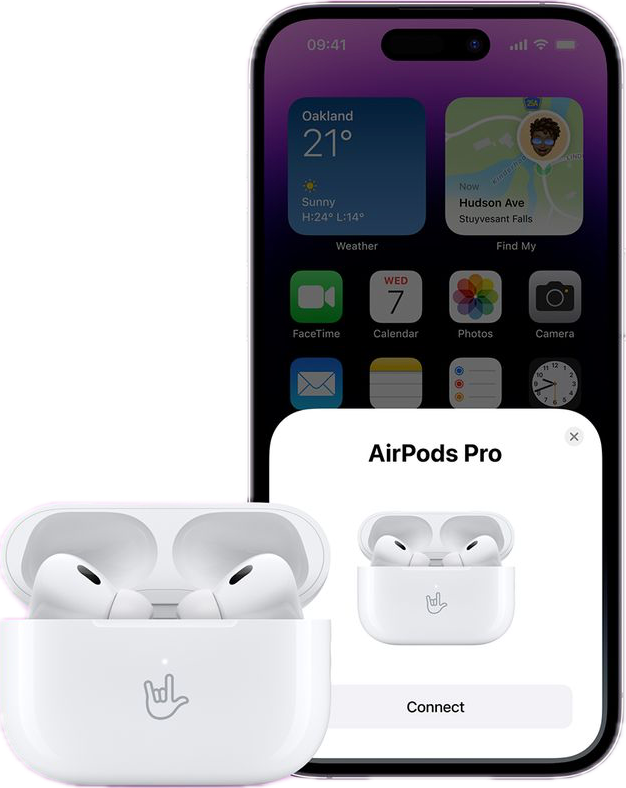
I designed and built the AirPods setup flow, including personalized engraving preview. The technical challenge was orchestrating real-time 3D hardware renders via SceneKit while synchronizing firmware state, CloudKit data, and UI responsiveness without dropping frames.
My Role
Technical Implementation
Rendering Architecture
SceneKit with custom shaders for engraving text. The rendering pipeline had to remain responsive while loading firmware data and syncing CloudKit in the background. UI responsiveness maintained through careful coordination of async data sources.
State Coordination
Three asynchronous data sources — firmware state, CloudKit, and GPU rendering — presented as a single coherent UI state. The architecture coordinates updates from each source while maintaining smooth UI performance throughout the setup flow.
System-level card UI pattern for focused, non-invasive flows across iOS
Overview
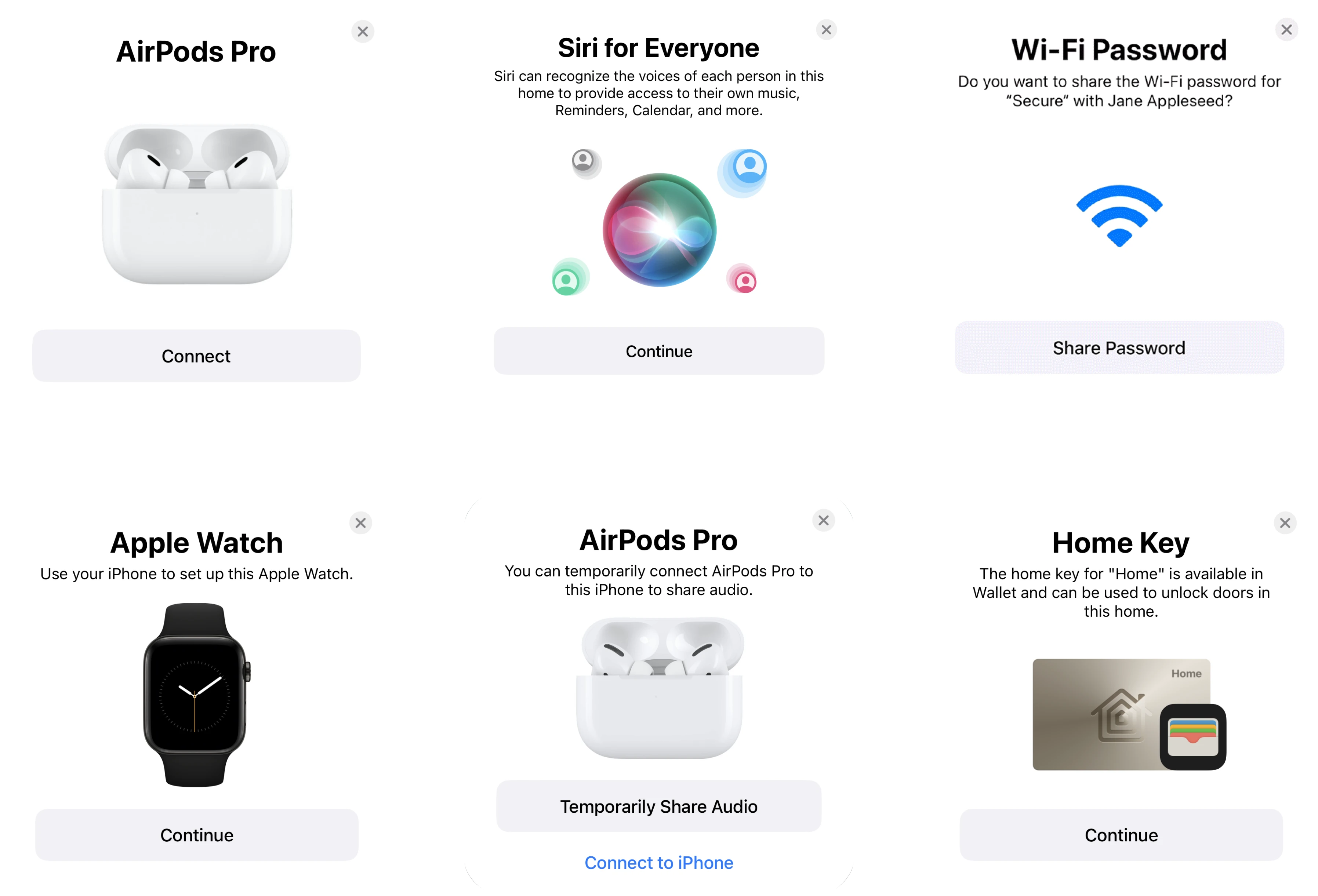
I architected and owned internal iOS frameworks that provide the system-level card UI pattern used throughout iOS. This pattern powers focused flows like device pairing, authentication, and setup across AirPods, AirTag, iPhone, and other products — adopted by approximately 30 Apple teams.
The design constraint: a UI system that's attention-commanding but non-invasive. The card needed to give full focus to the current flow while remaining minimal and streamlined, with a consistent system-wide look across all contexts and hardware.
My Role
Design Philosophy
Focused, not invasive
The card pattern demands user attention for critical flows without feeling like a full-screen takeover. It sits above other content, dims the background, but remains visually lightweight — commanding focus through context and contrast, not aggression.
System-wide consistency
Whether pairing AirPods, setting up an AirTag, or authenticating with Face ID, the card maintains the same visual language and interaction model. Users learn the pattern once and apply it across all contexts. Familiarity as trust.
Streamlined and minimal
Every element serves a purpose. No extraneous decoration, no unnecessary steps. The card shows exactly what the user needs to complete the flow — nothing more. This constraint lives in the framework itself, not just the guidelines.